Recover raw partition Windows 10, Recover raw partition Windows 7, raw partition recovery Windows 7/10/XP/Vista, help you recover data when drive or partition is raw file system,or recover files when your drive became a raw partition
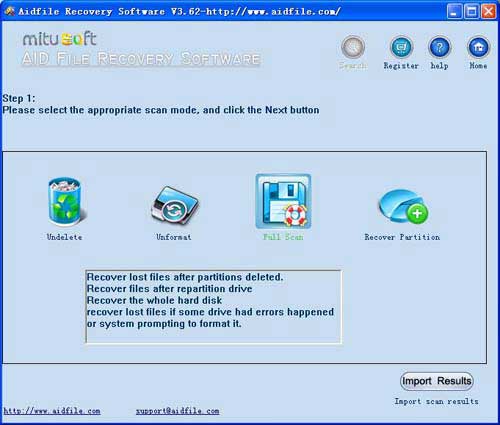
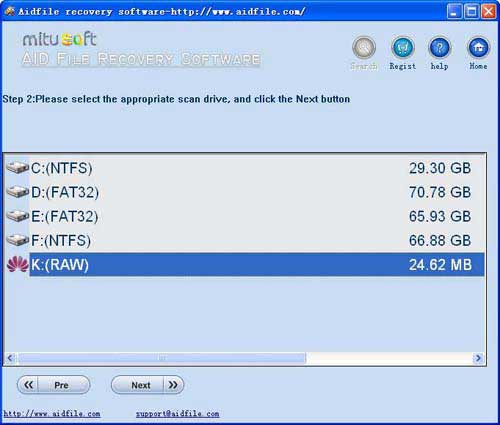
Use "Full Scan" mode to recover lost files if partitions show as "raw" or recover files which can not be found with "undelete" and "unformat" and "recover partition",recover files from raw partition,recover files of partitons which are not NTFS,nor exfat,nor fat32 with deep and full scan .
Compare with other Raw partition rescue system, Aidfile Raw file system partition recovery service is easy to use and powerful.
What is raw partition?
The term raw partition refers to the access of data on a hard drive or other storage devices directly at the individual byte level instead of through its file system as is usually done. Users can't access the raw partition and if a disk reads as raw in Windows, possible (but not all) symptoms will tell you:
The RAW partition means the file system is corrupted, system can't identify whether it is FAT, NTFS, EXT2 or EXT3, etc. Under this condition, you can't access this RAW partition, and you can't use files in this partition neither.
Fix RAW partition
Disable the controller in the CMOS setup, and remove the SCSI drivers, etc. associated with it in the Device Manager. And then reboot. If that doesnt work., and if it has a jumper on it, be sure its set to CS..computer select....if that doesnt work, try removing the jumper completely. If that still doesnt work, try to format the RAW drive, using NTFS or FAT under Windows system and EXT2 or EXT3 under Linux.
How to recover RAW partition
Here, recover RAW file system partition doesn't mean recover partition itself, but recover files from RAW partition. There are many recovery software, but the most powerful and efficient RAW partition recovery software is Aidfile
If your partition file system is not FAT32,EXFAT,NTFS,you can select "Advance scan" to recover data as Raw Partition.If your partition is displayed as "RAW", you can select "Advance scan" to recover data as Raw Partition.
Aidfile Partition Recovery Software Keyfeature
support EXFAT , FAT32 and NTFS file system
support Win32 and Win 64 bit
support hard disk, usb drive, flash drive, sd card , cf card and so on.
support Windows 11 & Windows 10,Windows XP, Windows 7, Windows 8,Windows 8.1, Windows Vista, Windows 2003, 2008, 2012.
MS Office document (Word, Excel, PowerPoint, Outlook) types (doc, docx, ppt, pptx, xls, xlsx, pst, etc.),photos (JPG, PNG, ICON, TIF, BMP, RAF, CR2, etc.), videos and audios (MPG, MP4, MP3, MTS, M2TS, 3GP, AVI, MOV, RM, RMVB, etc.), compressed files (rar, zip, etc.), PE files (exe, dll, lib, etc.) and so on.