Aidfile data recovery is best formatted bmp restore software , it can help you restore bitmap from formatted drive.
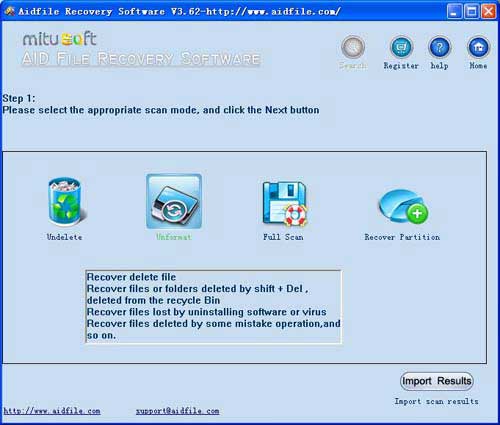
Use "Undelete" mode to restore deleted bmp files .
Use "Unformat" mode to restore lost bmp files after format hard drive .
Use "Recover partition" mode to restore bmp files if hard drive partitions changed or damaged or deleted.
Use "Advance Scan" mode to restore lost bmp files if partitions show as "raw" or restore deleted bmp which can not be found with "undelete",restore bmp files from raw partition,restore bmp files of partitons which are not NTFS,nor exfat,nor fat32.
Aidfile recovery software professional edition's "Advance Scan" support deep and full scan lost data from partition , hard drive, usb. completely recover all data from hard drive.
Learn more information about data recovery software for data loss.
As a user,whatever we tell you,whatever you want,just try it. If Aidfile can help you,we congratulate ,if not,just contact us.
The BMP file is a bitmap image format developed by Microsoft and commonly used in the Windows operating system. The main characteristic of this file type is "no compression". The bitmap image is the one used in for true standard windows image format.
Microsoft Word, Internet Explorer, Quick Time, Netscape are some of the common example applications used to view BMP files.
you must restore bmp files after format. Aidfile data recovery is good at restore files from formatted disk/usb
Aidfile Recovery Software Keyfeature
support FAT32 EXFAT and NTFS file system
support Windows 2000,2003,2008,2012,XP,Vista,7,8,(32&64 bits)
support hard disk,usb drive,flash drive,sd card ,cf card and so on.
support recover files from deleted partition
Not support iPhone and iPad