Western digital file recovery, wd data recovery to recover files from wd external hard drive, Western digital data recovery software free full version for wd external hard drive wd my passport ultra wd elements wd my book.Recover deleted files from Western digital external hard disk which is not detecting,not recognized,not working,corrupted,not showing up Windows 10 11 7 XP PC Bios device management.Western digital hard drive data recovery, recover data from Western digital external hard drive partition damaged formatted corrupted online software free dowload full version to recover data from WD my Passport WD Elements WD my book external hard drive WD Blue ssd WD my cloud and wd my book nas, WD Caviar, VelociRaptor, SiliconDrive, WD Black ,usb 3.0 2.0 3.1 usb type c b a portable desktop laptop pc hard drive (1TB, 2TB, 500GB, 3TB, 4TB, 1.5TB, 750GB, 300GB, 250GB,160GB,80GB, 6TB,8TB,10TB,12TB, 16TB, 24TB,120GB,40GB.) and recover lost data due to not formatted , not recognized , not working ,not showing up, power failure, logical damaged, not detected in bios,device io error.
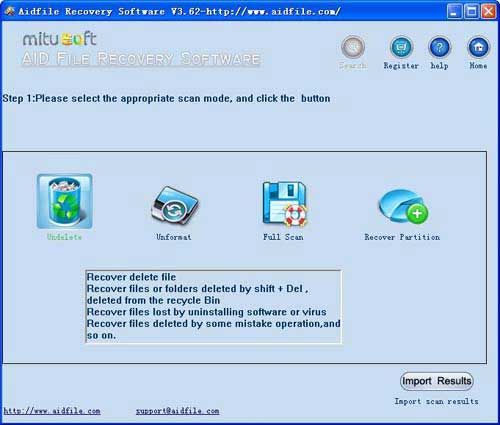
Use "Undelete" to recover deleted files from WD my book nas WD my cloud hard drive or after Virus attack, Recycle bin clear, disk cleanup, Press shift del by mistake, permanently empty recycle bin, shift delete ,accidentally deleted by a mistake.
Use "Unformat" to recover data from formatted Western Digital external hard drive WD my Passport wd my book wd my cloud nas after quick format,full format,accidentally formatted,reformatting,High-level formatting,Low-level formatting.
Use "Recover partition" to recover data from WD hard drive partition changed or damaged or deleted of WD my Passport and my cloud hard drive.
Use "Deep Scan" to recover data from WD Elements external hard drive partitions show as "raw" or recover data from wd my book live nas which cannot be found with "undelete" and "unformatted" and "recover partition", recover data from wd ssd raw partition, recover data from Western digital hard drive partitions which are not NTFS, nor exfat, or fat3,after showing an error, display as raw file system, unformatted, unknown partition, unpartitioned, needs to be formatted.
As a user, whatever we tell you, whatever you want, just try it. If Aidfile can help you, we will cheer for you, if not, just simply contact us.
We know Western Digital is the second largest computer hard disk drive manufacturer and provider in the world. Western Digital hard drives are often shortened as WD hard disk, WD hard drive, or WD HDD. As a data storage device, save the data file it is important to the security, if you are using the best hard drive; it cannot stop you from losing some important files, which you need to restore lost deleted or formatted files on Western Digital hard disk drive.
When you need rescue lost files on Western Digital hard disk drive, How to recover data from Western Digital external hard drives? Does the lost data file really can be recovered? So, First, You need to know why deleted files can be restored from Western Digital Hard disk drive. No matter the files are deleted from your hard drive disk by misuse, But the files are still intact there on the disk of your WD hard drive, so the deleted files are not rewritten on the disk, it is highly possible to restore them from your Western Digital hard drive.
Know the data exist on disk, then how to recover deleted files on Western Digital hard disk drive? As a matter of fact, the most effective way to restore deleted files on your Western Digital hard disk drive is to try a third party data recovery software. Deleted files on Western Digital hard disk drive can be recover with Aidfile Recovery software. Whatever you files lost because of accidentally deleted, formatted or hard disk drive suffer format error or virus attack, they can all be recovery with this data files recovery tool.
It is simple to finish the recovery Operation. Just install the software on your computer (with the right version) , connect yourWestern Digital hard drive to the computer, start the recovery software and you can restore lost files Prompted by the software operation.
If you still do not know How to recover data from Western Digital hard drives ? You can free download aidfile recovery software, scan you WD hard drives.
Aidfile WD Data Recovery Software Keyfeature
support EXFAT and FAT32 and NTFS file system and raw file system
support Win32 (32 bits )and Win64 (64 bit)
Windows 11 ,Windows 10,Windows XP, Windows 7, Windows 8.1,Windows 8, Windows Vista, Windows server 2003, 2008, 2012.
support external hard drive, usb drive, flash drive, wireless mobile storage,Network Attached Storage, External Zip Drive,Hybrid hard drive,Hot-swap hard drive,Internal hard drive,Removable hard drive, sd card , cf card,NAS,SSD and more.
Desktop & laptops Ultrabook:HP Pavilion,HP Compa,Alienware Alpha,Lenovo ThinkCentre,Lenovo IdeaCentre,Dell Inspiron,Dell XPS,Sony VAIO,Acer Aspire,Asus Transformer,Dell Latitude,Samsung Ativ Book,Asus VivoBook,HP Envy,Lenovo IBM ThinkPad,Lenovo IdeaPad Yoga,Microsoft Surface,Toshiba Satellite
MS Office document (Word, Excel, PowerPoint, Outlook) types (doc, docx, ppt, pptx, xls, xlsx, pst, etc.),photos (JPG, PNG, ICON, TIF, BMP, RAF, CR2, etc.), videos and audios (MPG, MP4, MP3, MTS, M2TS, 3GP, AVI, MOV, RM, RMVB, etc.), compressed files (rar, zip, etc.), PE files (exe, dll, lib, etc.) and so on.