Excel recovery, recover deleted excel files from formatted Windows 11/10 hard drive,free software for recovering excel files after delete or format from external drive or usb drive,sd card,flash drive,cf card ,mmc card
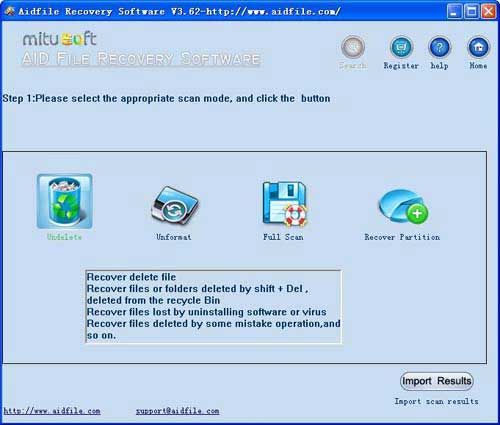
Use "Undelete" to rescue deleted Excel files after Virus attack,Recycle bin clear,disk cleanup,Press shift del by mistake,permanently empty recycle bin,shift delete ,accidentally deleted by a mistake.
Use "Unformat" to retrieve Excel files from formatted hard drive after quick format,full format,accidentally formatted,reformatting,High-level formatting,Low-level formatting.
Use "Recover partition" to restore Excel files if partitions changed or damaged or deleted.
Use "Full Scan" mode to rescue deleted Excel files which can not be found with "undelete" and "unformat" and "recover partition",recover Excel from raw partition,recover the Excel files of partitons which are not NTFS,nor exfat,nor fat32.With deep and full scan lost Excel from partition , hard drive, usb.
As a user,whatever we tell you,whatever you want,just try it. If Aidfile can help you,we congratulate ,if not,just contact us.
Aidfile is a powerful Excel document file recovery tool to restore lost doc files by file type from corrupted, damaged name etc. It supports EXFAT / FAT32 / NTFS file systems.
Aidfile recovery software is a Microsoft Excel recovery software utility designed to restore corrupt or damaged files that cannot be opened back into new trouble free files. This Excel file repair tool will restore your damaged Excel 95, 97, 2000, XP, 2003 and 2007 files easily in only a few minutes in your own computer.
If the folders are deleted or Excel file's name is unknown or file's information (file's MFT record in NTFS file system, file's Directory entry in FAT32 file system) is overwritten, Aidfile Recovery Software can scan the hard drive by MS Excel file type.
Aidfile have a free edition for you recovering 1G files with no pay.Just free download and try it.
Aidfile Recovery Software Keyfeature
support EXFAT , FAT32 and NTFS file system
Support Windows 11 & Windows 10,Windows 2000,2003,2008,2012,XP,Vista,7,8,(32&64 bits)
Support MS Excel document file types:xls,xlsx
Support MS Office Excel 2007,2003,2010,2012,etc.
Storage from Samsung,Seagate,Maxtor,Toshiba,WD,Sony,HP,IBM,Kingston,Sandisk,etc.
Storage types:Internal external hard drive,usb flash drive,sd card,memory stick,pen drive,etc.