Aidfile data recovery software can help you recover all files from formatted hard drive,
such as recover word files from formatted hard drive,recover excel files from formatted external hard drive,recover photo files from formatted memory card ,recover video files from formatted sd card ,recover pst files from formatted usb drive,recover pdf files from formatted pc,recover pictures from digital camera ,and so on.
Generally, every hard disk should be formatted before use, and may be reformatted for some reasons during working. When you format a disk, the Operating System erases all bookkeeping information on the disk, tests the disk to make sure all sectors are reliable, marks bad sectors (that is, those that are scratched), and creates internal address tables for later uses to locate information.But sometime when you accidentally reformat the computer system or hard drive/disk or partition,which because of: Operating System not found ;Invalid or corrupt FAT32/exFAT ; Cannot find file or program; Primary/Secondary Hard disk failure;Non system disk;Disk error; etc.
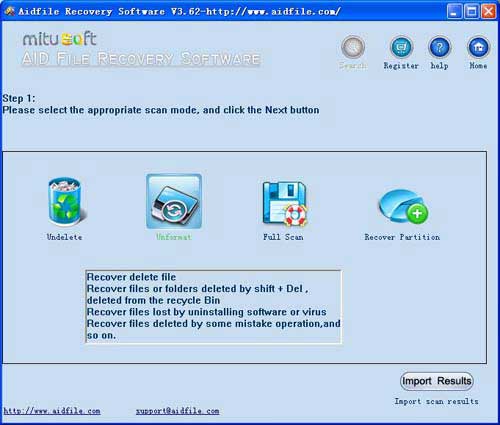
Use "Undelete" mode to recover deleted files from hard drive.
Use "Unformat" mode to recover lost files form formatted hard drive.
Use "Recover partition" mode to recover files if hard drive partitions changed or damaged or deleted.
Use "Advance Scan" mode to recover lost files if hard drive partitions show as "raw" or recover deleted files which can not be found with "undelete",recover files from raw partition,recover files of partitons which are not NTFS,nor exfat,nor fat32.
Aidfile recovery software professional edition's "Advance Scan" support deep and full scan lost data from partition , hard drive, usb. completely recover all data from hard drive.
Learn more information about data recovery software for data loss.
As a user,whatever we tell you,whatever you want,just try it. If Aidfile can help you,we congratulate ,if not,just contact us.
When you format your disk but forgot to backup data, how to retrieve data from hard drive from a format, Aidfile Recovery Software will recover lost data which had been formatted.
Aidfile Recovery Software is the most comprehensive formatted hard drive recovery software for windows and also the most useful formatted recovery software for users to restore formatted files. It can search for formatted drive/disk or partition on any version of Windows including - Windows 2000, 2003, XP, Vista, 2008, Windonw 7. Its Complete Recovery Mode is especially designed for formatted drive/disk recovery. It works excellently in format file recovery. If you are troubled or interested in how to recover files from formatted drive/disk or partition, please refer to Tutorial for recovering data after format for more details.
Recover files from formatted hard drive is easy for Aidfile Recovery Software . No matter the files on external hard drive formatted, Aidfile Recovery Software can get them back if they weren't overwritten by new data.
Aidfile Recovery Software Keyfeature
support FAT32 EXFAT and NTFS file system
support Win32 and Win64
support hard disk,usb drive,flash drive,sd card ,cf card and so on.
support recover files from deleted partition
Not support iPhone and iPad